Kuvatud on postitused sildiga kasulikud jupid. Kuva kõik postitused

About .Net assembly versioning ..

You make a cool reusable component, publish it and get it used by M people in N projects. Everything is good and under control.. until a CHANGE HAPPENS. And a few bugs from end-users. And you tweak some internal bits and add another feature.. Unless you have a good versioning practices in place, you'll be in dll-hell and everyone will hate you for making the messy never-working and poorly supported component in the first place.

The following describes a practice I use for versioning reusable components and staying in control (closer to sane).

What do I Need?

The absolute must is to understand from the dll itself which code it was compiled from.

For example if a user sends you email witha question or a problem you want to know what is the EXACT code they used. This is especially important to help ensure you can reproduce the problem they had.

Assembly identity must be unique enough without requiring constant effort from dev.

Thirdly, you want to control when assembly can be upgraded without recompile of caller assemblies. This is especially important when you have a chain of dependent assemblies one of the bottom layer ones get a non-breaking change - there is no need to recompile and re-release every other component in the chain. Even more when fully qualified names are stored in configuration. Obviously this must be used with care, as it is really bad when loader loads only partially compatible assembly and you get a runtime exception for missing a method or similar avoidable error.

imageA strong plus would be if you could check the version info on any computer, not requiring the availability or use of less known command line tools. Dll file properties in OS is a good place.

Optionally it would be cool to easily see from dll the exact date&time when assembly was created, by whom, where and which compilation flags were used (Debug/Release). This makes the assembly origin even more obvious.

what tools do I have?

Obviously there are attributes to attach metadata to my assembly:

    • This is used by the runtime loader to determine which assembly to load
    • Show in windows file properties as "File version" but only if there is no FileVersionAttribute value.
    • Format: forced 4-part numbered, i.e. '1.0.123.23425'
    • ignored by assembly loading
    • Some setup tools use it to decide if assembly should be upgraded or "already exists".
    • Show in windows file properties as "File version".
    • Format: free text but OS recognizes only 4-part numbered format.
    • Dumb metadata, show in windows file properties as "Product version".
    • Format: free text
  • AssemblyConfigurationAttribute and AssemblyDescription
    • Dumb metadata, readable only by .net tools.
    • Format: free text

Note that while assemblyVersion supports asterisk to autogenerate last 2 components, it does not work for FileAttribute so it is of no use.

Windows explorer properties has Details view which exposes some metadata about dll versions:

What version SCHEME to use?

I suggest every assembly to be identified by 4-part numbered version number:

  • <major> - increment on major functional change
  • <minor> - increment on every breaking functional change
  • <date> - compile timestamp for uniqueness
  • <time> - compile timestamp for uniqueness

AssemblyVersion: '<major>.<minor>.0.0'.
FileVersion: '<major>.<minor>.<date>.<time>'
InformationalVersion can contain everything else.

<date> and <time> part should be human-readable and if possible ever-increasing. Since the numbers are limited by UInt16 max value then some compromise is probably necessary.

For example: there may be assembly release 1.2.0.0, deployed as compiled file 1.2.30425.1148, stating that it was released by me on my PC A, today before lunch.

I don't see a real need to have more than 2 parts for AssemblyVersion. For:

  • Hotfix (no breaking API change) - change only compile timestamp.
  • non-breaking functional change - depending on change consider incrementing <minor> or just treating it as hotfix.
  • breaking functional change - increment <minor> or optionally <major>.

I suggest against using AssemblyDescriptionAttribute or configurationAttribute for versioning info as it is more difiicult to browse this info for random dlls.

How to get it automatically?

Obviously AssemblyVersion must be changed manually by devs. Not automatics needed there.

[assembly: AssemblyVersion("1.2")]

On the other hand FileVersion and InformationalVersion should be regenerated on each build. For this I created a T4 template AssemblyInformationalVersion.tt:

<#@ template debug="false" hostspecific="true" language="C#" #>
<#@ assembly name="System.Core" #>
<#@ import namespace="System" #>
<#@ import namespace="System.Linq" #>
<#@ import namespace="System.IO" #>
<#@ output extension="gen.cs"#>
<#
    string informationalVersion;
    string assemblyVersion;
    string fileVersionAddition;
    try
    {
        var path = this.Host.ResolvePath("AssemblyInfo.cs");
        string versionLine = File.ReadAllLines(path).Where(line => line.Contains("AssemblyVersion")).First();
        assemblyVersion = versionLine.Split('"')[1];
        if (assemblyVersion.Split('.').Length != 2) { throw new Exception("AssemblyVersion must be in format '<major>.<minor>'"); }

        DateTime compileDate = DateTime.Now;
        int yearpart = compileDate.Year % 10 %6; //last digit mod 6 (max value in version component is 65536)
        fileVersionAddition = yearpart + compileDate.ToString("MMdd") + "." + compileDate.ToString("HHmm");

        informationalVersion = String.Format ("{0} (on {1} by {2} at {3})",
            assemblyVersion,
            DateTime.Now.ToString("s"),
            Environment.UserName,
            Environment.MachineName
        );
    }
    catch ( Exception exception)
    {
        WriteLine("Error generating output : " + exception.ToString());
        throw;
    }

 #>
using System.Reflection;

//NB! this file is automatically generated. All manual changes will be lost on build.
// Generated based on assembly version: <#= assemblyVersion #>
[assembly: AssemblyFileVersion("<#= assemblyVersion #>.<#= fileVersionAddition #>")]
[assembly: AssemblyInformationalVersion("<#= informationalVersion #>")]

.. and trigger it on each build, for example by pre-build event:

"%COMMONPROGRAMFILES(x86)%\microsoft shared\TextTemplating\11.0\TextTransform.exe" -out "$(ProjectDir)\Properties\AssemblyInformationalVersion.gen.cs" "$(ProjectDir)\Properties\AssemblyInformationalVersion.tt"

So, on each build I will have detailed versioning info generated for my assembly automatically:

using System.Reflection;

//NB! this file is automatically generated. All manual changes will be lost on build.
// Generated based on assembly version: 1.2
[assembly: AssemblyFileVersion("1.2.30415.1128")]
[assembly: AssemblyInformationalVersion("1.2 (on 2013-04-15T11:28:42 by MyUser at MYMACHINE)")]

There is a one-time, simple copy-paste setup and then it just works as long as you use Visual Studio for compilation. Not 100% sure if AssemblyInfo.cs file path is resolved by build server hosts.

Sellest kuidas lugeda väga suuri faile..

Vahel juhtub, et keerad mõnele automaatteenusele selja ja enne kui arugi saad, on tekkinud 10GB logifail. Windows-platvormi notepad ei ole ehk väga hea mõte selle faili avamiseks.

Sobivaks vahendiks on aga Large Text File Viewer.

Hea:

  • väga kerge ja kiire!
    • näiteks 2GB+ fail avaneb hetkeliselt ja programm võtab mälu vaid ca 20MB.
  • freeware, tingimused siin
  • staatiline binaar. ei mingit installimist.
    • kogu programm (koos madonna jm piltidega) <1 MB
  • split-screen sama faili erinevate kohtade võrdlemiseks

Halb:

  • ei mingit failide muutmist
  • dokumentatsiooni järgi on tugi ainult ASCII & Utf-16, ka UTF-8 korral võib tulla ebameeldivaid üllatusi.
  • Otsing on aeglane, ma ei taha teada mis juhtub kui väga koledate regulaaravaldist kasutada 10GB failil.
  • sisaldab mõttetuid featuure
    • näiteks editori taustapilt, isekeriv help-tekst abi aknas jms.

Kokkuvõtvalt: kaugel ideaalist kuid kitsas hiigelsuure faili lugemise rollis päris hea tööriist.

About WebDAV: do it yourself ..

Facing an integration task using WebDAV brought me to take a look closer at WebDAV and corresponding tools for .Net platform. This is part of a short series:

-----

Why pay others do have fun and use the protocol? How hard could be to implement just the few pieces I need ..

What do I need ?

The simplest scenario you can get from WebDAV:

  • List folder contents, get name/urls, size, differentiate files & subfolders
  • upload a file from memory
  • download a file to memory

For testing purposes I use IIS 7.5 as my WebDAV server.

What IS WebDAV ?

Basically an extension of HTTP protocol to use web servers as file systems. It is described in IETF RFC 4918. A Quick overview can be get from wiki and there’s an official-like site webdav.org which provides more links and resources. 

how to Get List of contents ?

I could simply make an HTTP GET request and a html page from get web server containing links to its contents. But this is ugly and there is the webdav way using PROPFIND instead of GET.

PROPFIND relies on xml query sent with http request. RFC contains also some example queries. The query I need would be something like this:

<?xml version="1.0" encoding="utf-8"?>
<D:propfind xmlns:D="DAV:" xmlns:ns0="DAV:">
<D:prop>
<ns0:displayname/>
<ns0:iscollection/>
<ns0:getcontentlength/>
</D:prop>
</D:propfind>

To send the query to web server using PROPFIND in simple:

var request = (HttpWebRequest)HttpWebRequest.Create(targetUri);
request.UseDefaultCredentials = true;
request.Method = "PROPFIND";

var bytes = Encoding.UTF8.GetBytes(query);
using (var requestStream = request.GetRequestStream())
{
requestStream.Write(bytes, 0, bytes.Length);
}
request.ContentType = "text/xml";

But now you’ll get an error which is not the most helpful:
System.Net.WebException: The remote server returned an error: (403) Forbidden.

The resolve is to read the spec and find the mandatory “Depth” header which determines if you want properties only on the targeted item (value 0), with direct children (value 1) or recursively (value “infinity”). To add that header:

request.Headers.Add("Depth", "1");

Now the request is set up, reading the response gives as requested data in xml format:

using (var response = (HttpWebResponse)request.GetResponse())
using (var responseStream = response.GetResponseStream())
using (var responseContents = new MemoryStream(2048))
{
responseStream.CopyTo(responseContents, 2048);
return Encoding.UTF8.GetString(responseContents.ToArray());
}

The result could be something like this:

<D:multistatus xmlns:D="DAV:">
<D:response>
<D:href>http://imrepyhvel/webDavTest/</D:href>
<D:propstat>
<D:status>HTTP/1.1 200 OK</D:status>
<D:prop>
<D:displayname>webDavTest</D:displayname>
<D:getcontentlength>0</D:getcontentlength>
<D:iscollection>1</D:iscollection>
</D:prop>
</D:propstat>
</D:response>
<D:response>
<D:href>http://imrepyhvel/webDavTest/bb.txt</D:href>
<D:propstat>
<D:status>HTTP/1.1 200 OK</D:status>
<D:prop>
<D:displayname>bb.txt</D:displayname>
<D:getcontentlength>4</D:getcontentlength>
<D:iscollection>0</D:iscollection>
</D:prop>
</D:propstat>
</D:response>
</D:multistatus>

The tricky part is that different servers may return data in slightly different ways. For example folders may not have some properties (like “getcontentlength”) in which case there’s another “propstat”-block with different “D:status". RFC describes the possible statuses.

Another suggestion is to help clean up the HTTP communication and use these optional settings for HTTP request which obviously remove HTTP 100 and continuous handshaking:

request.PreAuthenticate = true;
request.ServicePoint.Expect100Continue = false;

How to download A file ?

Heey, you already know that. That's what HTTP GET method is about ..

How to upload a file?

This is less common but still simple:

WebRequest request = WebRequest.Create(targetPath);
request.UseDefaultCredentials = true;
request.Method = "PUT";

using (Stream stream = request.GetRequestStream())
{
contents.CopyTo(stream, 2048);
}
request.GetResponse();

What do I think ?

Most is simple HTTP action. The only tricky part is working with metadata (PROPFIND) but with help of RFC and google, you won't get stuck. If you are on low budget or only need simple scenarios then doing WebDav by yourself is not a problem.

The good:

  • what you do yourself is free
    • No licence fees
    • no limitations on deployment
    • no copyright or copyleft unless you want to create one.
  • Seems simple enough
  • know-how can be applied using every language capable of creating-sending-receiving HTTP traffic
  • Performance & traffic is as efficient as you write it
    • 3 tasks = auth challenge + 3 request-response pairs
    • approx 41 ms

image

The bad:

  • Requires some time to explore RFC and write/google the proof of concept codes
    • Some hours will do for simple scenarios.
  • Requires more time in case of problems
    • no support/bugfixes from outside
    • the reasons behind those uninformative 403s are hard to track down.
  • Requires more time to test
    • there will be quirks on different WebDAV servers as experienced by running my code in both IIS and on livelink folders.

About WebDAV: using Independentsoft client ..

Facing an integration task using WebDAV brought me to take a look closer at WebDAV and corresponding tools for .Net platform. This is part of a short series:

-----

Another commercial client - WebDAV .NET from Independentsoft, priced 299 EUR and up.

What do I need ?

The simplest scenario you can get from WebDAV:

  • List folder contents, get name/urls, size, differentiate files & subfolders
  • upload a file from memory
  • download a file to memory

For testing purposes I use IIS 7.5 as my WebDAV server.

What Does it do?

Homepage promises compatibility to WebDAV RFC 2518.

Only interesting fact from homepage is support for ANY .Net Framework, including Compact Framework and Mono.

What did I get ? / How did I do it ?

Once again, I achieved my supersimple goals.

Initializing the client:

var session = new WebdavSession();
session.Credentials = CredentialCache.DefaultNetworkCredentials;
var resource = new Resource(session);

This Resource thingy is weird, but I hope it makes sense to somebody. Now, fetching contents and showing only files ..

var selectProperties = new PropertyName[] { DavProperty.DisplayName, DavProperty.IsCollection, DavProperty.GetContentLength };
foreach (var item in resource.List(folderUri.ToString(), selectProperties))
{
if (item.Properties[DavProperty.IsCollection].Value == "1") { continue; }
Console.WriteLine("{0} ({1} bytes)",
item.Properties[DavProperty.DisplayName].Value,
item.Properties[DavProperty.GetContentLength].Value
);
}

I really like that I can enumerate the properties I’m interested in and the choice of valid names are accessible using DavProperty container. Downside is that the seemingly simple and universal API requires me to check for the existance of given properties in output (not done in sample) and parse-interpret the values. It is straightforward considering the protocol, but the resulting code is not the cleanest. Now, to downloading..

using (var stream = new MemoryStream())
{
resource.Download(folderUri.ToString() + "/bb.txt", stream);
var contents = Encoding.Default.GetString(stream.ToArray());
}

Almost as simple as it gets – download that URI into that stream. How about upload?

var newFileName = "NewFile_" + DateTime.Now.ToString("dd-HHmmss") + ".txt";
var content = "Whatever content";

using (var stream = new MemoryStream(Encoding.Default.GetBytes(content)))
{
resource.Upload(folderUri.ToString() + "/" + newFileName, stream);
}

Once again elegant -  data from this stream to this url.

What do I think ?

Simple, straightforward, efficient – exactly the way you want your libraries to be. On the downside for trickier parts you better (get to) know what happens in the protocol level. Using the default configuration it provided seemingly optimal traffic. If I had the licence, I would use it for my WebDAV needs.

The good:

  • decent API
    • default scenarios are made quite simple.
    • with xmldoc.
  • Commercial product but
    • Has evaluation option (30 days)
    • even entry level licence has royalty-free redistribution with your software.
    • source code option is available (for extra fee)
  • Seems fast
    • For example: list properties you are interested.
    • with default settings: 3 tasks = auth challenge + 3 request-response pairs in HTTP track
    • approx 42 ms

image

  • Supports Compact Framework & Mono
    • official Mono support is no common. A good cause!
  • Nice attitude from support
    • On evaluation request I got a mail from a specific developer in Independentsoft stating that if I have problems or need examples then he’ll try to help (“usually in few minutes”). It was an automated message, but still – encouraging!

The bad:

  • Commercial product
    • 300 EURs for starter is a bit heavy for simple needs in a single project
    • They do want your email for evaluation version.
  • Homepage says it is based on RFC 2518 which is an obsolete specification and is marked to be superseded by RFC 4918.
    • Not sure what’s the difference in real world but it is a sign of worry, because RFC 4918 seems to be from June 2007.
  • Code may be straightforward but not always as clean as it could be.
    • for example : reading property values after PROPFIND

About WebDav: using IT Hit .Net library ..

Facing an integration task using WebDAV brought me to take a look closer at WebDAV and corresponding tools for .Net platform. This is part of a short series:

-----

Even if inventing your own wheel could be fun, it’s not always reasonable thing to do. I couldn’t find any freeware trustworthy-looking clients with brief googling so the first candidate is a commercial client - WebDAV client library from IT Hit, whose pricing starts from 350 USD.

What do I need ?

The simplest scenario you can get from WebDAV:

  • List folder contents, get name/urls, size, differentiate files & subfolders
  • upload a file from memory
  • download a file to memory

For testing purposes I use IIS 7.5 as my WebDAV server.

What Does it do?

Homepage promises compatibility to WebDAV RFC 2518.

More interesting features include:

  • requires .Net Framework 2.0 or .Net Compact Framework 2.0 SP1
  • high-level API
  • versioning support (DeltaV)
  • resumable uploads-downloads

What did I get ? / How did I do it ?

As expected, I achieved my supersimple goals.

Initializing the client:

string license = File.ReadAllText("WebDav-.net client_License.xml");
var session = new WebDavSession(license);
session.Credentials = CredentialCache.DefaultNetworkCredentials;
IFolder folder = session.OpenFolder(folderUri); //work in this folder.

Note that licence information has to be applied in-code in xml format.

Creating a IFolder is not mandatory for all tasks but as I happen to work in a single specific folder then I’m reusing the same object and declaring it next to the master-object session. Now, let’s see what’s in that folder..

foreach (IHierarchyItem item in folder.GetChildren(false))
{
if (item.ItemType != ItemType.Resource) { continue; }
Console.WriteLine("{0} ({1} bytes)",
item.DisplayName,
((IResource)item).ContentLength
);
}

Note that API is not the MOST readable: that “false” means non-recursive, files are called “resource” and even though most common properties are present in IHierarchyItem, file size is not. Code sample excerpts on home page were of no use. Also, I could not find it from object during runtime because the assembly code is obfuscated. Whatever, solution was found only after digging into IT Hit sample application. Let’s go download a text file contents..

var downloadResource = folder.GetResource("bb.txt");
using (Stream stream = downloadResource.GetReadStream())
using (var reader = new StreamReader(stream))
{
var contents = reader.ReadToEnd();
}

There was sample code present and the simple task gets simple solution. I’m getting used to looking for Resources. Possibility to get a file by local name (as opposed to always working with full URI) is a nice touch. Next task is to upload a file ..

var newFileName = "NewFile_" + DateTime.Now.ToString("dd-HHmmss") + ".txt";
var content = "Whatever content";

var uploadResource = folder.CreateResource(newFileName);
using (var datastream = new MemoryStream(Encoding.Default.GetBytes(content)))
using (Stream uploadstream = uploadResource.GetWriteStream(datastream.Length))
{
datastream.CopyTo(uploadstream);
}

Create resource in folder and get stream to write to that resource – seems reasonable. The downside is that if I do not know my data stream length in advance then I could be in trouble. There probably are some workarounds, but these API calls just happen to have that limitation. Just beware.

What do I think ?

The API is high level and using code exercpts in IT Hit home page you could get most of your tasks done relatively fast. I would trust it to do the job, espectially trickier stuff.  Still - I didn’t get the feeling that “this is The Tool to use for WebDAV”. Far from it.

The good:

  • decent API
    • you really don’t need to know much about webDAV.
    • Some helpful abstractions and hiding of webdav properties are a helpful for quickstarters
  • Commercial product but
    • Has evaluation option (1 month)
    • even entry level has royalty-free redistribution with your software.
    • source code option is available (for extra fee ofc)
  • Seems reliable
    • I ran into very few error messages and the ones I did see were informative.
    • testapp worked without modifications also on Livelink WebDAV folder.
  • support Compact Framework

The bad:

  • Commercial product
    • You can’t even get evaluation version without registration.
  • Homepage says it is based on RFC 2518 which is an obsolete specification and is marked to be superseded by RFC 4918.
    • Not sure what’s the difference in real world but it is a sign of worry, because RFC 4918 seems to be from June 2007.
  • no xml doc
    • I’m not going to go to their website or open up a separate help-file just to see comments on parameters and to find out that class PropertyName is “WebDAV property name”. I want intellisense so I wouldn’t waste my time!
  • API could be better
    • I could not perform ANY tasks by intuition alone. Not even the “download that file”-task. Even worse – I had to dive into sample application code just to know how to get file size.
  • Code is obfuscated
    • runtime debugging won’t help you much (af.g==false? Oh, really?!)

image

  • default protocol usage is chatty and non-optimal.
    • for example: it queries for all properties when you care only about a few.
    • example of chattiness for the 3 simple tasks (took approx 100 ms)

image

Sellest, kuidas parsida C# koodifaile..

Laisk inimene ei tee käsitööd vaid kulutab (halvemal juhul sama suurusjärku) aja loomaks vahendeid, mis nüri töö tema eest ära teeks. Mul oli vaja iga koodifaili kohta teada, mis nimeruume ta deklareerib ja millised klasse ta sisaldab. Failide arv on paari tuhande ringis, seega käsitsi üle käimine ei olnud kindlasti plaanis.

Regexp ?

Esimene mõte oli vanad head regulaaravaldised. Nende lugemine ja debugimine on küll tükk vaeva, aga päris palju saab ära teha. Lihtsustatud stsenaariumi nimeruumide leidmine on mõõdukal lihtne : need on faili alguses, enne deklaratsiooni on üldjuhul vaid using-käsud ja erinevad kommentaarid, võib-olla ka hunnik whitespace’i. Aga sisemised nimeruumid ? mitu nimeruumi failis?  atribuudid ? Klasside leidmine oleks sel meetodil veel kordades keerukam, sundides arvestama ka näiteks string-konstantides sisalduvaga jms..

Või parser ?

Ja siis taipasin – nii tore kui jalgratta leiutamine ja regulaaravaldiste kirjutamine ka ei ole, antud probleem on ju juba ammu lahendatud. Iga C# koodiparser teeb oma põhitöö seas just seda, mida mul vaja. Näiteks proovisin SharpDevelop’i (vabavarane IDE c# jm jaoks) koosseisu kuuluvat NRefactory-nimelist parserit.

Samm1: muretse NRefactory

NRefactory näib olevat kättesaadava ainult SharpDevelop koosseisus, mille installeri  saab siit: http://www.icsharpcode.net/OpenSource/SD/Download/, misjärel on teek leitav sõltuvalt installeerimise kohast, näiteks siit:

C:\Program Files (x86)\SharpDevelop\4.0\bin\ICSharpCode.NRefactory.dll

Kui sa ei taha SharpDevelopiga tutvuda, siis dll saab loomulikult ka SharpDevelopi lähtekoodist.

Samm2: Kood

using ICSharpCode.NRefactory;
using ICSharpCode.NRefactory.Ast;

Parseri loomisel ei ole just palju valikuid, kuid mõned siiski. kuna meid huvitavad ainult klassid-nimeruumid, siis sobib näiteks selline parseri loomine.

IParser parser = ParserFactory.CreateParser(@"C:\Somepath\somecodefile.cs");
parser.ParseMethodBodies = false;
parser.Parse();

if (parser.Errors.Count > 0)
{
throw new Exception(String.Format("Parsing of '{0}' failed, Errors: {1}.",
codeFile.FullName, parser.Errors.ErrorOutput));
}

// this is my method to query the information.
WalkFile(parser.CompilationUnit.Children);


Meetod WalkFile() käib rekursiivselt läbi AST (Abstract Syntax Tree) ja viskab mind huvitava informatsiooni konsooli. Loomulikult oleks kena rekursiooni vältida, aga see ei ole praegu oluline:

private static void WalkFile(List<INode> nodes)
{
foreach (var node in nodes)
{
var asNamespace = node as NamespaceDeclaration;
if (asNamespace != null)
{
Console.WriteLine("Namespace found: '{0}' from {1}",
asNamespace.Name, asNamespace.StartLocation.ToString());
}

var asType = node as TypeDeclaration;
if (asType != null) {
Console.WriteLine("Type found: '{0}' from {1}",
asType.Name, asType.StartLocation.ToString());
}
WalkFile(node.Children);
}
}

Ja tulemuseks näiteks midagi sarnast:

Namespace found: 'SomeRoot.Parent' from (Line 6, Col 1)
Type found: 'ClassInParent' from (Line 8, Col 2)
Type found: 'SubClass' from (Line 10, Col 3)
Namespace found: 'ChildNamespace' from (Line 23, Col 2)
Type found: 'ClassInChild' from (Line 25, Col 3)

Mõistmaks, mis klass-nimeruum, mille sees asub, peaks muidugi vanemate ahelat vms infot meeles pidama, aga see ei ole enam midagi keerulist.

mis edasi ?

Koodifailide parsimine võimaldab teha koodi pealt päris huvitavaid päringuid. Näiteks kontrollida:

  • kas klassid jms ikka kasutavad kokkulepitud nimetamisreegleid ?
  • millised klassid ei järgi kokkulepitud public/internal/private-reegleid?
  • millised koodifailid ei järgi “1 file = 1 class” põhimõtet ?
  • millised koodifailid ei asu õiges kaustas (näiteks nimeruumi järgi) ?
  • mitu rida on pikim meetod ?

Mitte kõike neist ei saa teha reflectioni abil ja erinevalt reflectionist ei ole sul vaja kompileerimist, vaid piisab märgatavalt vähematest eeldustest: ainult vaadatavad koodifailid peab olema süntaktiliselt korrektsed. Puuduvad teegid, või kompileerimist takistavad vead ei takista teisi faile analüüsimast. Või suvalist faili.

Võimalik on teha näiteks koodifailide konverteerijat, mis näiteks eemaldab või lisab atribuute, muudab klassivälju, näiteks field –> property jne. Üks väike video sel teemal on näiteks siin. AST abil koodifailide muutmisel on küll miinuseks see, et kommentaarid lähevad kaotsi, mistõttu on ehk kaval kasutada parsimist informatsiooni pärimisks ja kasutada parseri antud asukohainfot automaatsete muudatuste tegemiseks muid vahendeid kasutades.

About Excel exporting using Nikasoft NativeExcel..

I’m still looking at Excel components. From the same series so far:

This time I’ll try Nikasoft NativeExcel and follow the same procedure as in previous posts of the series.

What does it do ?

Works without Excel, creates Excel 97-2003 documents, which may contain formulas, images, formatting etc. See the feature list yourself. It seems to support everything I need.

What do I need ?

Support for data types, unicode, basic formatting, formulas, cell merge, column width – the same things as in my previous excel-component test.

What did I get ?

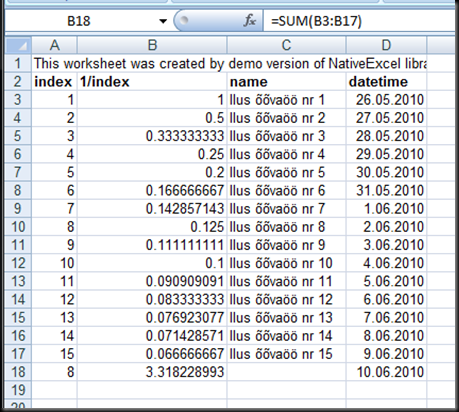
As already becoming a norm - functionally I got everything I wanted. Again, as I used demo version then it overwrote the top-left cell with warning “This worksheet was created by demo version of NativeExcel library”. I didn’t like that it overwrote my own text in there without warning which is more invasive than Winnovative’s extra sheet. In production I hope they’ll somehow lose it, I hope.

The file was a Excel 97-2003 xls file, And even though it provided tools to export Excel 5 and 97 version as well as CSV and a few more, it does NOT support xlsx. Not a big thing but a sign.

image 

How did I do it ?

using System;
using System.Globalization;
using System.Threading;
using NativeExcel;

public class NativeExcelTest
{
private const int DummyRows = 15;

public static void Build()
{
//prepare sheet
IWorkbook book = NativeExcel.Factory.CreateWorkbook();
IWorksheet sheet = book.Worksheets.Add();
sheet.Name = "Sample";

//create data
int currentRow = 1;
//we can use excel style range instead of coordinates.
sheet.Cells["A1:D1"].Merge();
sheet.Cells["A1"].Value = "demonstrate merge";

BuildHeaderRow(sheet, ++currentRow);
for(int i = 1; i <= DummyRows; i++)
{
BuildDataRow(sheet, i, ++currentRow);
}
BuildSummaryRow(sheet, ++currentRow);

//corrigate column widths:
sheet.Cells.Autofit();

//output result
book.SaveAs("Native_result.xls");
}

private static void BuildHeaderRow(IWorksheet sheet, int toRow)
{
sheet.Cells[toRow, 1].Value = "index";
sheet.Cells[toRow, 2].Value = "1/index";
sheet.Cells[toRow, 3].Value = "name";
sheet.Cells[toRow, 4].Value = "datetime";
sheet.Cells[toRow, 1, toRow, 4].Font.Bold = true;
}

private static void BuildDataRow(IWorksheet sheet, int dataIndex, int toRow)
{
//generate dummy data row using dataIndex for values:
sheet.Cells[toRow, 1].Value = dataIndex;
sheet.Cells[toRow, 2].Value = 1.0M / dataIndex;
sheet.Cells[toRow, 3].Value = "Ilus õõvaöö nr "
+ dataIndex.ToString(CultureInfo.InvariantCulture);
sheet.Cells[toRow, 4].Value = DateTime.Today.AddDays(dataIndex);
}

private static void BuildSummaryRow(IWorksheet sheet, int toRow)
{
sheet.Cells[toRow, 1].Formula = String.Format("=AVERAGE(A{0}:A{1})", toRow - DummyRows, toRow - 1);
sheet.Cells[toRow, 2].Formula = String.Format("=SUM(B{0}:B{1})", toRow - DummyRows, toRow - 1);
sheet.Cells[toRow, 4].Formula = String.Format("=D{0}+1", toRow - 1);
//it didn't get the formula type correctly.
sheet.Cells[toRow, 4].NumberFormat
= Thread.CurrentThread.CurrentCulture.DateTimeFormat.ShortDatePattern;
}
}


Some subjective numbers:

  • ~64 lines of code (including empty lines, usings, etc)
  • runs approx 200-240 ms on E8300 @2.83GHz, 4GB RAM.

What do I think ?

Having previously tried Winnovative component, the transition was smooth and without serious problems. All differences for my simple testcase were rather small and syntactic. Maybe I’m biased, but it felt a bit messier than Winnovative component. But as there is also price difference then better try it out yourself before choosing one or the other.

The good

  • mostly managed code, .Net fw 2.0
    • Requires windows as there’s reference to GDI32.dll
  • relatively cheap
    • $140 (registered user licence)
      • it seems there it may be with source code but without the right to modify
      • not sure if licencees are named developers or how the number of development machines matter.
      • unlimited deploy
    • $450 (site licence)
      • source code + right to recompile
      • All employees can develop
      • unlimited deploy
  • Probably single dll deployment (~0.5 MB)
  • Seems to do everything I need
  • decent API
    • friendly and flexible cell referencing tools, similar to those of Winnovative.
      • indexed (row 1, col 1) or “A1”-style
    • no adding of empty cells/rows as for CarlosAG.
  • Some documentation in web (mostly in the form of code samples

The bad:

  • Not free
    • see the prices mentioned above. Not much but more than nothing.
  • No xlsx
    • It probably is not so important to end-users, but I like the idea of the new format. Not to mentioned this is the format to be supported by Excel longer and better than the older one.
  • No xmldoc included with demo dll
    • The documentation is in web though, maybe will be included after buying the licence.
  • slower than any component I’ve seen
    • 200ms-250ms for the trivial testcase. This is 4-6 times slower than other components I’ve tested. Uh-oh, this is no small difference.
  • Some weird things in API
    • prefixes, like “xl”, “mso”, “H”, “V”. This smells of bad style.
    • interfaces & factories for everything. Seems unneccessary complex design for simple things. Debugging and code readability suffers because of actual class hiding.
  • Lots of releases. 
    • started in 2006, but since the start of 2009 there has been 19 releases, including sometimes with just 1 day apart. They are either really fast at responding to bug notices or there are quality problems. Not sure which.
  • Uncertainty for demo vs licenced version
    • No information if/how the demo version and registered assemblies differ or how licence existance is verified at runtime, does the assembly remain the same, etc.

About Excel exporting using Winnovative Excel Library for .NET

In search for a good managed Excel exporting tool I’ve come to test a Excel library from Winnovative. I’ll follow the same procedure as in my previous Excel-related post about CarlosAG component for easier comparison..

What does it do ?

Create xls/xlsx documents, including containing formulas, images, comments, charts, etc. Operate with CSVs, load data from DataTables, etc. See the feature list yourself.

What do I need ?

Support for data types, unicode, basic formatting, formulas, cell merge, column width – the same things as in my previous excel-component test.

What did I get ?

Functionally - everything I wanted. Actually for not having licence I got one extra sheet reminding me that fact, but that is not going to be the issue for production environments.

The file was decent xlsx-file, I also briefly tested getting the older xls_2003-file and it seemed to be working as well. No warning on open.. just such file:

image

How did I do it ?

using System;
using System.Globalization;
using System.Threading;
using Winnovative.ExcelLib;

public class WinnovativeExcelTest
{
private const int DummyRows = 15;

public static void Build()
{
//prepare sheet
ExcelWorkbook book = new ExcelWorkbook(ExcelWorkbookFormat.Xlsx_2007);
ExcelWorksheet sheet = book.Worksheets[0];
sheet.Name = "Sample";

//create data
int currentRow = 1;
sheet["A1:D1"].Merge(); //wow, we can use excel style range instead of coordinates.
sheet["A1"].Text = "demonstrate merge";

BuildHeaderRow(sheet, ++currentRow);
for(int i = 1; i <= DummyRows; i++)
{
BuildDataRow(sheet, i, ++currentRow);
}
BuildSummaryRow(sheet, ++currentRow);

//I don't like the default it offered so I'm setting it myself:
sheet[currentRow - DummyRows, 4, currentRow +1, 4].Style.Number.NumberFormatString
= Thread.CurrentThread.CurrentCulture.DateTimeFormat.ShortDatePattern;

//corrigate column widths:
sheet.AutofitColumns();

//output result
book.Save("Winnovative_result.xlsx");
}

private static void BuildHeaderRow(ExcelWorksheet sheet, int toRow)
{
sheet[toRow, 1].Text = "index";
sheet[toRow, 2].Text = "1/index";
sheet[toRow, 3].Text = "name";
sheet[toRow, 4].Text = "datetime";
sheet[toRow, 1, toRow, 4].Style.Font.Bold = true;
}

private static void BuildDataRow(ExcelWorksheet sheet, int dataIndex, int toRow)
{
//generate dummy data row using dataIndex for values:
sheet[toRow, 1].Value = dataIndex;
sheet[toRow, 2].Value = (1.0/dataIndex); //decimal is not recognized as number, by doc floats are.
sheet[toRow, 3].Value = "Ilus õõvaöö nr " + dataIndex.ToString(CultureInfo.InvariantCulture);
sheet[toRow, 4].Value = DateTime.Today.AddDays(dataIndex);
}

private static void BuildSummaryRow(ExcelWorksheet sheet, int toRow)
{
sheet[toRow, 1].Formula = String.Format("=AVERAGE(A{0}:A{1})", toRow-DummyRows, toRow-1);
sheet[toRow, 2].Formula = String.Format("=SUM(B{0}:B{1})", toRow-DummyRows, toRow-1);
sheet[toRow, 4].Formula = String.Format("=D{0}+1", toRow-1);
}
}


Some subjective numbers:

  • ~64 lines of code (including empty lines, usings, etc)
  • runs approx 55-60 ms on E8300 @2.83GHz, 4GB RAM.

What do I think ?

I may be a bit biased toward them because I’ve used their PDF libraries before, but it DID feel good to code this API, clean and simple.

The good

  • Fully managed code, .Net fw 2.0
  • Single dll deployment (~3.5 MB)
  • Seems to do everything I need + more
    • by documentation, did not try them all.
    • images, comments, hidden columns, DataTable to sheet, etc ..
  • Good sleek API
    • you don’t get drowned in methods but you can do a lot with the ones given.
    • very friendly and flexible cell referencing tools
      • indexed (row 1, col 1) or “A1”-style
      • the same for cell ranges
    • dynamically tracking the cells to use:  no manual creation of 100 empty lines to add a single value to 100th row.
    • applying styles on the fly to cells/ranges. no manual messing with prepared styles unless you want to.
  • Automatic cell value type detection
    • no need to format datetimes (unless you want to) or think about decimal separator.
  • Good documentation
    • sample project in package.
    • xmldoc alongside dll
    • helpful user guide (I had two questions during this testing, I found both answers with less than a minute from the manual.
  • Respectable company
    • For all the bugs I’ve seen in their products, I’ve seen also the release to fix it.
    • there is tech support.
  • Fully functional evaluation possible
    • Can test everything before buying. The only addition is one extra sheet in file reminding that you cannot go live without a licence.
    • The same dll as the licenced version. Adding a licence 2 days before release will not give dll-problems.

The bad

  • It’s not free
    • prices start from 350$. Too expensive to buy for personal use, but for enterprises this is good value for the money.
    • licence key should be stored within system.
  • It’s not open source
    • no legal way to know or modify what the component does..
  • .NEt requirements
    • it requires System.Web which means it cannot be used with .NET FW 4 client profile. This may be important in some scnearios.
    • it requires .NET 2.0, but i don’t think this is a problem. FW 1.1 applications should have died out a long time ago.
  • Noticable dll size
    • 3.5MB is not too heavy and we have tons of RAM and HDD but smaller size would be even nicer.
  • Could be slower than some alternatives
    • I didn’t do proper performance-testing but for this ultrasmall sample file it was ca 25% slower than CarlosAG.
  • Decimals are not automatically recognized as number types.
    • floats can be used instead or kept as general type (default). Not sure if this is a excel limitation or Winnovative component optimization.

About Excel exporting in CarlosAG way..

I was looking for managed code component for excel exporting and happened to test a freeware component named CarlosAG Excel XML Writer Library. The following contains my thoughts about the pros and cons..

What does it do?

“This library allows you to generate Excel Workbooks using XML, it is built 100% in C# and does not requires Excel installed at all to generate the files. It exposes a simple object model to generate the XML Workbooks.
It supports several features for generating Excel Workbooks including:

  • Formatting
  • Alignment
  • Formulas
  • Pivot Tables
  • and more... “ (From carlosag.net)

This is nice, I suppose, but these keywords are not good enough for me. I want to try it out and see what the developer sees and what exactly will end up in the file.

what do I need ?

The excel functionality I want is quite simple actually:

  • to support data types
  • to support unicode

I’ll also try out fancier things which I foresee myself using at some point:

  • basic formatting (background colors, bold, borders would be nice)
  • formulas – it can avoid tracking values across rows/cols in code
  • cell merge
  • setting column width

For testing I’ll create a excel file programmatically, trying to use these features..

What did I get ?

I could get my needs fulfilled with some minor struggling. The output file is xml, schema seems similar to the one described in:
http://en.wikipedia.org/wiki/Microsoft_Office_2003_XML_formats
.

This is the output in excel with no modifications:

image

How did I do it?

This is the code I used. The chosen methods may not be optimal but it does indicate the API you could end up using..

using System;
using System.Globalization;
using CarlosAg.ExcelXmlWriter;


public class CarlosAGTest
{
private const int DummyRows = 15;
private const string HeaderStyleName = "headerStyle";
private const string DateStyleName = "dateStyle";

public static void Build()
{
//prepare sheet
Workbook book = new Workbook();
Worksheet sheet = book.Worksheets.Add("Sample");

//delcare header style
WorksheetStyle style = book.Styles.Add(HeaderStyleName);
style.Font.Bold = true;

WorksheetStyle dateStyle = book.Styles.Add(DateStyleName);
dateStyle.NumberFormat = "Short Date";

//create data
sheet.Table.Rows.Add(BuildMergedRow());
sheet.Table.Rows.Add(BuildHeaderRow());
for(int i = 1; i <= DummyRows; i++)
{
sheet.Table.Rows.Add(BuildDataRow(i));
}
sheet.Table.Rows.Add(BuildSummaryRow());

//set column width:
sheet.Table.Columns.Add().Width = 5;
sheet.Table.Columns.Add();
sheet.Table.Columns.Add().Width = 150;

//output result
book.Save("CarlosAG_result.xls");
}

private static WorksheetRow BuildMergedRow()
{
WorksheetRow row = new WorksheetRow();
var lastCell = row.Cells.Add("demonstrate merge");
lastCell.MergeAcross = 3;
return row;
}

private static WorksheetRow BuildHeaderRow()
{
WorksheetRow row = new WorksheetRow();
//demonstrate overloads of adding cell contents.
row.Cells.Add(new WorksheetCell("index") { StyleID = HeaderStyleName });
row.Cells.Add("(1/index)", DataType.String, HeaderStyleName);
row.Cells.Add(new WorksheetCell("name", DataType.String, HeaderStyleName));
row.Cells.Add("dateTime", DataType.String, HeaderStyleName);
return row;
}

private static WorksheetRow BuildDataRow(int rowIndex)
{
//generate dummy data row using rowIndex for values:
WorksheetRow row = new WorksheetRow();
row.Cells.Add(rowIndex.ToString(CultureInfo.InvariantCulture), DataType.Number, null);
row.Cells.Add((1.0M/rowIndex).ToString(CultureInfo.InvariantCulture), DataType.Number, null);
row.Cells.Add("Ilus õõvaöö nr " + rowIndex.ToString(CultureInfo.InvariantCulture), DataType.String, null);
row.Cells.Add(DateTime.Today.AddDays(rowIndex).ToString("s"), DataType.DateTime, DateStyleName);
return row;
}

private static WorksheetRow BuildSummaryRow()
{
WorksheetRow row = new WorksheetRow();
var averageCell = row.Cells.Add();
averageCell.Formula = "=AVERAGE(R[-" + DummyRows + "]C:R[-1]C)";

var sumcell = row.Cells.Add();
sumcell.Formula = "=SUM(R[-" + DummyRows + "]C:R[-1]C)";

row.Cells.Add();

var plusOneCell = row.Cells.Add(null, DataType.DateTime, DateStyleName);
plusOneCell.Formula = "= R[-1]C + 1";
return row;
}
}


A few subjective numbers:

  • The file was generated with approx 40-50 ms on E8300 @2.83GHz, 4GB RAM.
  • 88 lines of code (including empty lines, using-statements, etc).

What do I think ?

If you are low budget then CarlosAG is certainly a good tool to use. Far from ideal, though.

The good:

  • It did everything I wanted
  • Free. no cost, use as you want.
  • Fully managed code, requires just .net FW 1.1
  • Simple deplopyment  - just a single ~100k dll.
  • Reasonably simple API.

The bad:

  • no source code
    • just the one from reflector
  • no documentation
    • no xmldoc file for dll, chm in website was broken and failed to show a single page of it.
  • no automatic value formatting
    • cell values have to be set as strings, the of API user has to manually format contents to be saved into XML. What format is expected is not obvious.For example: Datetimes, decimal separators, etc. This could lead to hard to debug problems.. and it did.
  • Probable lack of support
    • Developer seems to have made this library for fun, this could mean loss of quality and support. For example, last realease was in 2005. It is foreseeable that problems have to be solved by yourself, digging knee-deep into reflector-generated code. For code written in .net FW 1.1, this could be ugly.
  • API lacks some comfort-features

    • You have to create lots of rows and cells and columns. To add something to n-th row you have to ensure all rows up andincluding n-th row are created. same for cells, and columns.

  • No native xls/xlsx output.

    • just xml with <?mso-application progid='Excel.Sheet'?>

  • The formula input language in unknown to me
    • I'd prefer to write exactly what I would write in excel. No doubt the given langugage could be more helpful but it adds to the learning curve. For example I’m using "=SUM(R[-30] C:R[-1]C)" instead of “=SUM(A1:A30)”.

Links

Official site:
http://www.carlosag.net/Tools/ExcelXmlWriter/

Sample for exporting dataset contents:
http://www.sitepoint.com/blogs/2006/08/22/making-excel-the-carlosag-way/

Sellest kust testimiseks IE5.5-8 leida..

Veebidisaini tehes on tavaline see, et kõik ilusad plaanid ebaõnnestuvad, sest mingis dokumendis on nõue, et “peab toetama Internet Explorer 7+” vms. Ja siis sa istud oma IE8 peal ja mõtiskled, kellel/millises masinas võiks vastavat brauserit leida. Ohh, tüütu!

Pisut abi on ehk utiliidist IETester, mis võimaldab mingi täpsusega emuleerida vanemaid IE versioone:
 image
Kui olla pisut paranoiline, siis lõpptestiks ma seda brauserit ei usalda, kuid arenduse-aegseks kiirtestiks küll.

Windows 7 kasutajatel on üsna lihtne viis ka IE6 saamiseks. Nimelt on Windows XP Mode koosseisus tolle aja brauser. Kui sul on XP Mode juba olemas, on sul ka päris IE6 juba olemas.

Sellest kuidas käsurealt MSSQL andmeid kätte saada..

KL soojal soovitusel uurisin pisut MSSQL2005 utiliiti nimega bcp (loe: Bulk Copy), mis võimaldab otse käsurealt vahendada andmeid baasi ja andmetega failide vahel. Süntaks on mõõdukalt lihtne, kuid omab siiski paari twisti. Paar näidet kasutamisest allpool:

1) Väljastada tabeli X_USER sisu faili bcpTest.txt

C:\>bcp SomeDb..X_USER out bcptest.txt -c -C RAW -Usa -Slocalhost

Tähelepanu tuleks pöörata siis kindlasti vajadusele määrata kuidas kooditabelitega hakkama saada (-C RAW), muidu komistad sa pikalt ja pidevalt järgmise veateate otsa:

Starting copy...
SQLState = S1000, NativeError = 0
Error = [Microsoft][ODBC SQL Server Driver][SQL Server]Code page 775 is not supported by SQL Server
SQLState = S1000, NativeError = 0
Error = [Microsoft][ODBC SQL Server Driver]Unable to resolve column level collations

BCP copy out failed

Antud lahendust ja põhjuseid kirjeldatakse ka siin.

2) Väljastada üks baasis hoitab pdf faili bcptest.pdf (image andmetüübist)

C:\>bcp "select DATA from SomeDb..DATA_FILE where ID=1281" queryout bcptest.pdf -Usa -localhost -N

Andmete sisestamiseks on samuti vahendid. Samuti saab seadistada veel tulesid-vilesid. Näiteks muuta veeru- ja reaeraldajaid.

Sellest kuidas mugavalt regulaaravaldisi luua ja debugida..

Leidsin selle tarbeks täna sellise utiliidi, nagu:
Rad Software Regular expression Designer

Välja näeb pmslt selline:

RegexDesignerMainScreen

Mõned kasulikud featuurid:

  • hea help samas rakenduses
  • RegexOptions seadmine (SingleLine, MultiLine, IgnorePAtternWhitespace jms)
  • Lihtne kuid kustomiseeritav UI (dokitavad alamaknad)

Ehk teeb kõike mis vaja ja on seejuures väike ja lihtne.